

































The title of this article is a thinly veiled attempt at humor about the timing of this review. It has been a year since Garmin first showed its long-anticipated color portable in July 1999 at EAA AirVenture, and since then I’ve lost track of how many emails I’ve received asking when I was going to review the unit.
For a while, I had an easy excuse – there simply weren’t any GPSMAP 295s available to review. One of Garmin’s highest-volume aviation dealers is Avionics West Inc., located at my home airport of Santa Maria, Calif., and owned by my good friend Tom Rogers. So I figured that if anyone could get me a 295 to review, it would be Tom. But throughout the fall and winter of 1999, the shipping date for the units kept slipping, even though Garmin was already shipping its non-aviation StreetPilot, which is basically the same hardware but with different software. At first, Garmin admitted that the GPSMAP 295 software wasn’t quite ready for prime time. Months passed, and Garmin said the software was ready but the manual wasn’t finished.
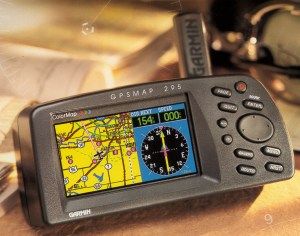 Finally, Garmin started shipping the units to dealers in February 2000, but by then Avionics West had a backlog of hundreds of customer orders, and every other Garmin dealer was in the same boat. I’m sure Tom Rogers would have liberated a 295 for me had I asked, but I didn’t think it was fair to cut into line ahead of Tom’s paying customers. Garmin was willing to lend me a demo unit, but those were in such short supply and long demand that I’d have been able to keep it for a week or two at most. That just wasn’t enough.
Over the years, I’ve established strict “personal minimums” for writing avionics reviews. I simply won’t try to review a complex device like a GPS until I’ve had a chance to actually fly with the unit for at least 20 hours (preferably more) so I can really put the thing through its paces. Anyone who reads the manufacturer’s sales brochures and spends an afternoon poking at the buttons can write a glowing article about the strong points of a product, but to uncover its weaknesses and “gotchas” takes hours upon hours of actual use that explores every corner of the operating envelope. To me, that’s what makes the difference between the sort of probing reviews we try to do in AVweb and the superficial “puff pieces” that often appear in those glossy “tree-killer” aviation magazines.
Acid-Test Flight
Finally, Garmin offered to let me fly with a GPSMAP 295 for all of June and July. The timing was absolutely perfect.
In June, Joe Godfrey and I would be flying my Cessna T310R from California to Pensacola, Fla. (where Joe had scheduled a Profiles interview with Capt. Bob Rasmussen, former Blue Angel and director of the National Museum of Naval Aviation), then on to Key West to join up with the Cayman Caravan across Cuba to Grand Cayman (where I was giving a safety seminar at Cayman Islands International Aviation Week). Joe would then fly home on the airlines, and I would be flying the twin Cessna to the West Coast solo, with stops at Boca Raton, Fla. (for an AVweb meeting), Mobile, Ala. (to visit Teledyne Continental Motors), and Ada, Okla. (to visit GAMI). This mission would cover 5,100 nautical miles in two weeks, and total 27 hours flying time.
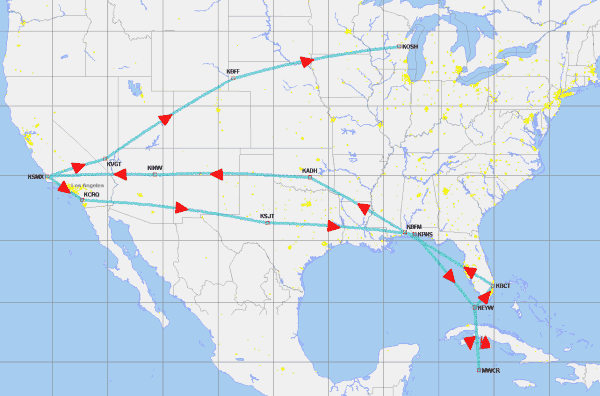
Then, after a few weeks back home in California, I’d be off again to Oshkosh, Wis., with AVweb’s marketing manager (and Cessna 172 owner) Ann Devers in the right seat. That would be another 1,600 nm and just over 8 hours of flying. So by the time I was to return the box to Garmin at EAA AirVenture, I’d have nearly 7,000 nm and 35 hours of GPSMAP 295 experience under my belt. I’d also have the benefit of “second opinions” from another high-time instrument pilot (Joe Godfrey) and from a low-time non-instrument pilot (Ann Devers). That ought to be sufficient.
Okay, Convince Me!
Although I always try to approach reviews like this with an open mind, I must admit that I started out fully prepared not to like the GPSMAP 295 very much. Its overall appearance reminded me a lot of Garmin’s GPS III Pilot that I’d reviewed in 1997 and didn’t care for very much at all. Like the GPS III, the new 295 was based on a hardware platform originally designed for automotive use (StreetPilot). It had a form factor obviously designed for dashboard mounting and a dumb-looking wider-than-high screen.
I also started out unconvinced about the value of the color display. Clearly, color is the 295’s main selling point, and offers the kind of “sizzle” that must have brought big smiles to the faces of Garmin’s sales managers and advertising executives. But how much would it really add to the unit’s functionality, and would it really be worth the extra cost and power draw? Color me skeptical.
Thirty-five hours and 7,000 nautical miles later, I have to admit that my initial doubts about the GPSMAP 295 have largely evaporated. It’s simply a terrific radio, and my new first choice among high-end portables, prevailing over the Garmin GPSMAP 195 and Lowrance AirMap 300 that have been my top picks for the past couple of years. The new Garmin is definitely not perfect and could be improved in several areas, but it’s still the portable I’d buy for my own airplane. (In fact, I’m probably going to do exactly that as soon as Tom puts it on special during AirVenture 2000!)
Hardware
Size and appearance
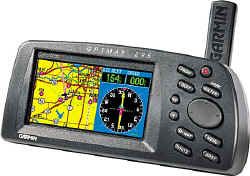 While the Garmin 295 is still a bit chunky for a yoke-mounted portable (at 3.2″H x 6.8″W x 2.6″D and 1.4 pounds), it’s actually a tad smaller and exactly the same weight as Garmin’s monochrome 195 (whose size I found ungainly). I’ve finally given up on calling these things “handhelds” because they’re definitely not meant for one-handed operation like smaller units (e.g., Garmin GPS 92, Lowrance AirMap 100, Magellan 315A). While you certainly could hold the GPSMAP 295 with one hand and punch the keys with the other (at least until your arm got tired), there’s little doubt that this box was designed to be hard-mounted on an automotive dashboard or airplane glareshield or yoke.
The main reason that the 295 (and 195 for that matter) are so big and heavy is primarily due to the big battery pack they require: six AA-size alkalines. The irony is that I’d guess the lion’s share of these units will be “permanently” mounted on the yoke or glareshield and powered off the supplied cigarette-lighter power cord, making the internal batteries pretty much excess baggage. At least that’s how I found myself using the unit for nearly all the time I flew with it. (Frankly, the power drain of the 295 makes this a poor choice for battery-powered operation.)
Actually, I think Lowrance had it right in their original AirMap design which was packaged as two more-or-less equal-sized modules: the main GPS/map and a detachable battery pack. In yoke-mounted operation of the AirMap, the battery pack is not required and may be detached … although it can be used to provide backup power if desired. I really wish Garmin had plagiarized this approach in designing the 195 and 295. I guess I must be in the minority on this one – not only did Garmin not adopt this idea, but also Lowrance abandoned it in their later AirMap 100 product!
Display
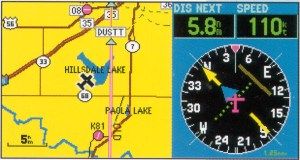 It’s big, it’s bright, and it’s oh so colorful. The 295’s rectangular display is about the same size as the 195’s (a tad larger, actually), but laid out in landscape (wider-than-high) rather than portrait (higher-than-wide) orientation. This is clearly not the best choice for an aviation moving map because pilots tend to be a lot more interested in what lies straight ahead than what’s passing by the wingtips. For this reason, I was a little bit surprised that the 295 did not offer a software option (as did the smaller GPS III Pilot) to rotate the display 90 degrees into portrait orientation. In fairness, however, most pilots will operate the 295 most of the time in split-screen mode where the right one-third of the screen is devoted either to alphanumeric data (distance, track, groundspeed, ETE, ETA, etc.) or an HSI display, leaving the left-hand two-thirds for a moving map display which is roughly square.
I was worried that Garmin would have to sacrifice resolution when they changed from the 195’s monochrome display to the 295’s color display. They didn’t. The 295’s display has a resolution of 160 x 305 pixels (compared to 160 x 240 for the 195), and each pixel is capable of 16 colors (compared with four-level grayscale). The 295’s display is every bit as sharp and easy-to-read as the 195’s, and the color makes the map much easier to decipher since different colors are used for course lines, roads, state boundaries, etc. To be honest, after 35 hours with the 295’s color map (plus a bunch more with the also-colorful Sandel SN3308 that I installed in my airplane a year and a half ago), I’d find it very difficult to go back to a monochrome map … even a first-rate one like that on the Garmin 195.
Keypad
 The 295’s keypad is classic Garmin, and any pilot who is familiar with the GPSMAP 195 or GPS III Pilot will feel right at home with it. There are a few changes from the 195’s keyboard layout: the two-way “zoom” rocker switch has been replaced with two separate buttons marked “out” and “in,” and the power on/off button has a different shape from the others so it’s harder to press by accident. Garmin’s signature four-way rocker switch for cursor control has been retained, although I still find it harder to use than the four separate up-down-left-right arrow keys used by other manufacturers.
The biggest change is, of course, the position of the keypad: to the right of the screen on the 295, compared to above the screen on the 195. This is a big step forward – I always found the 195’s top-mounted keypad location awkward since your hand tends to obscure the screen when you’re punching the buttons.
Battery
The 295 holds six AA-sized alkaline batteries, same as the 195. However, the 295’s always-backlit color display is much more power-hungry than the 195’s monochrome display (which is normally only backlit for night flying). While Garmin quoted battery life on the 195 as “up to 10 hours” if backlighting was not used, the 295 spec sheet quotes battery life as “up to 4 hours” and it can be as little as 2.5 hours.
These figures are based on using high-quality alkaline batteries – if you use rechargable NiCd or NiMH batteries instead, figure on 50 percent less. Also note that, just like the 195, the 295 has no provision for recharging batteries while they’re inside the radio. If you use rechargables, they must be removed and charged separately.
The bottom line is that the Garmin 295 is simply not well suited for battery-powered operation. Most users will want to use the included cigarette-lighter power cable to power the unit from aircraft power (10-35 volts DC), and treat the internal batteries primarily as an emergency backup supply. If you’re flying a glider or a Taylorcraft with no electrical system, I’d suggest looking at a power-efficient GPS like the Garmin GPS 92 or Magellan 315A … or possibly buying stock in Duracell Corporation.
Antennas
Unlike the 195, the 295 has no built-in antenna. Instead, it comes with two separate antennas, either of which can be connected to the standard BNC antenna jack on the back of the radio. There’s a stick-type antenna that attaches directly to the unit, and a patch-type antenna with a suction-cup window mount and a thin feedline that connects to the radio. The stick antenna may be adequate for dashboard and glareshield mounting, but the remote antenna is a must for yoke-mounted operation (at least in metal airplanes). The standard BNC connector also makes it especially easy to hook the 295 to a permanently mounted external GPS antenna.
Mounting brackets
 There are two ways to mount the 295: a stick-on dashboard or glareshield mount, and a clamp-on yoke mount. Both come standard with the unit.
The dashboard/glareshield mount is compact and clever, with a tilt adjustment for optimum viewing. However, the adhesive mount makes this bracket a semi-permanent installation, which could certainly be a consideration for renter-pilots. Some pilots I’ve talked to really like a glareshield-mounted GPS, likening its position atop the glareshield to a heads-up display. I’ve never had much luck with this concept, however. I find the glareshield-top location problematic for two reasons: it’s awkward for me to operate the keyboard atop the glareshield (especially if it’s bumpy), and it’s hard to include the display in an instrument scan when flying in IMC. Your mileage may vary, of course.
The yoke mount is a big, bulky, clamp-on affair that looked as if it would fit most any airplane with a control yoke. While it’s an improvement over the kludgy yoke mount that came with the 195, I was somewhat annoyed by the huge clamp assembly that hangs down beneath the control column and looks like it was designed to accomodate a 747 or C-5A yoke. When I clamped the thing to the left-hand yoke in my Cessna T310R, the clamp knob got in the way when I reached for certain switches on the lower sub-panel. With it mounted on the right-hand yoke, I found that I couldn’t open the airplane’s glove compartment to retrieve my sunglasses without first pulling back on the yoke. Garmin certainly engineered a clamp-on yoke mount that’s sturdy and adjustable for a wide range of aircraft, but I wish they’d managed to do so with something that was a bit more compact.
GPS engine
The Garmin 295 shares the same basic “Phase Trac 12” 12-parallel-channel GPS engine used by the 195 and GPS III Pilot. It’s an excellent receiver which acquires a position fix very quickly and holds on for dear life. Never once in my 35 hours of flying did the GPSMAP 295 report that it had lost track of its position, nor did I ever notice any positional discrepancy between the Garmin 295 and my panel-mounted IFR-approved GX50 GPS.
Software
Operating logic
Garmin appears to have standardized its user interface. If you are comfortable operating a Garmin 195 portable or a Garmin 430 or 530 panel-mount, you’ll be right at home with the 295 because its operating logic is virtually identical. Even if you haven’t operated a Garmin GPS before, it won’t take you long to learn the ropes.
Basically, the unit has six main display pages:
- Satellite status page
- Present position page
- Moving map page
- HSI page (aviation mode) or RMI page (land mode)
- Active route page
The “PAGE” key cycles through these six pages in sequence, while the “QUIT” key cycles through them in reverse order. Pressing “MENU” while viewing any main page brings up a pop-up menu of available options for the current page. Pressing “MENU” again brings up the main menu that contains global configuration options. Menu selections are made by scrolling to the desired item using the cursor rocker key and then pressing “ENTER.” To exit a menu without selecting anything, press “QUIT.”
It’s as logical and simple as it sounds. In fact, after not having touched any Garmin GPS for at least two years, I managed to survive my 35-hour flight test of the GPSMAP 295 without ever once having to look at the 100-page “Pilot’s Guide & Reference” to figure out how to accomplish what I wanted to do. Instead, I’d just noodle around until I figured it out for myself. To me, that’s the acid test of a good user interface, and the 295 passed with flying colors.
New and nifty features
Since the operating software in the 295 is almost identical to the Garmin 195, I won’t go through it in detail. If you’re interested in a general overview, you can read what I wrote about the 195. If you’d like all the gory details, you can download the GPSMAP 295 user’s manual as a PDF file from the Garmin site.
There are a few new features that are worth mentioning, however. One of my past gripes with the 195 was how difficult it was to de-clutter the screen to make it easier to read a too-busy moving map. The 295 has a new shortcut for temporarily removing some of the map detail by simply pressing the “ENTER” key one or more times. The first keypress removes background map detail (highways, cities, rivers and small lakes); the second removes all background and airspace boundary detail; the third removes all airports, navaids and fixes except for the ones on the active route; and one more restores the screen to full detail again. This is an extremely handy feature, and a great improvement.
 Another super-neat feature is the ability to scroll the cursor to an area of special-use airspace on the map, whereupon the 295 pops up a little tag that gives the name, type, and limit altitude for the specified SUA. (See screen shot at right.) If you need more information, pressing “ENTER” pops up a window with information on the controlling ATC facility and frequency. Nice!
The regular 295 daytime display portrays land masses as bright yellow, but the software supports a nighttime mode that changes the yellow to black and is much easier on the night vision. (The screen shot at right is in night mode.) You can switch from day mode to night mode manually, or activate a function that automatically switches modes at sunset and sunrise (since the GPS knows the exact time and your timezone). Pretty clever.
Naturally, the 295 has all of the great features pioneered in the 195. For instance, these two are the only portable GPSs that contain GPS approach information and all approach fixes in the database. They’re also the only ones that provide a vertical-navigation (VNAV) readout in the form of a glideslope-like cross needle on the HSI display. I used both of these features a lot – especially the VNAV guidance.
There are plenty of other neat features tucked away in the dark corners of the 295’s operating software. The aviation database is also far more extensive in scope than any other GPS I’ve flown with, portable or otherwise. If it’s not in the database, you probably don’t need it.
Gotchas
As good as the 295’s user interface is, however, it’s not perfect, and I did run into the occasional “gotcha” during my 35 hours of flying with it. One of the funniest (and most frustrating) had to do with adjusting the display brightness. On the 295, this is done by tapping the “POWER” button to bring up a brightness-contrast adjustment window, then making adjustments with the cursor-control rocker. Our “gotcha” occurred on the morning that Joe and I were preparing to depart Pensacola for Key West. We’d arrived at PNS late at night, and we’d had to dim the 295’s display way down from its typical ultra-bright daytime setting. Well, when it came time to depart, Joe powered-up the 295 but nothing appeared on the screen. He tried turning the unit off and back on, but still nothing. For a moment, we were concerned that the unit had failed, but we quickly realized that the problem was simply that the screen’s brightness adjustment had been dimmed so much that we couldn’t make anything out in bright light. Eventually, we were able to shield the display from sunlight enough to make out the display and figure out how to increase the brightness. Clearly, though, there needs to be an easy shortcut for bringing the screen back to full brightness. Perhaps there is some secret sequence of key presses that does this, but it wasn’t obvious and there’s nothing in the manual.
Another “gotcha” that bit me a few times had to do with the identifier-entry dialog used for creating routes, selecting direct-to fixes, and so forth. Normally, the identifier-entry procedure involves using the four-way rocker key to enter an alphanumeric identifier (e.g., KPNS for Pensacola airport, or ETX for East Texas VOR). Once you get the identifier keyed in, you press “ENTER” once to accept the identifier and then press “ENTER” a second time to insert it into the route or to activate it as the next direct-to fix. However, sometimes an identifier is ambiguous: for instance, “CDR” denotes both the Chadron (Neb.) VOR and also the Conception Del Oro (Mexico) VOR. When this happens, the GPSMAP 295 pops up a special dialog box that lists the various alternative interpretations of the identifier you entered, and asks you to select one from the list. Unfortunately, you get so used to pressing “ENTER/ENTER” after entering an identifier that it becomes automatic. So if the software pops up its “Which one do you mean?” dialog, the second “ENTER” keypress winds up selecting the first item on the list of alternatives. Unfortunately, the first item on the list is probably not the one you want, since the software does not sort the list of alternatives in any logical order (such as closest first or even U.S. first). On several occasions, this “gotcha” wound up causing me to inadvertently enter route fixes that were half-a-world away. When I realized what was going on, I couldn’t help but think of the tragic American Airlines crash in Cali, Colombia, caused by a software-induced data-entry error involving the Boeing 757’s flight management system.
I use the route feature a lot (virtually every flight), and came to feel that entering new routes in the GPSMAP 295 required twice as many keystrokes as it should have. This isn’t a new problem – the procedure for entering routes is almost identical to the one on the Garmin 195, and I had the same complaint about that model two years ago. You’d think that more users would have complained and that Garmin would have optimized the route-entry software by now, but maybe other pilots are more tolerant of this sort of thing than I am.
 Mapping and database updates

The GPSMAP 295 comes with a PC update cable. Software and database updates and are uploaded into the unit using a Windows-compatible PC. (There is no support for Macintosh.) The latest operating software is available for download from Garmin’s Web site at no charge.
The standard Jeppesen NavData database includes worldwide airports and VORs, plus a regional database of NDBs, intersections, special-use airspace, runway data, and frequencies for airports, FSS, and ARTCC facilities. There are three regional versions of the database: Americas, Atlantic International, and Pacific International. NavData updates (distributed on 3.5″ diskette) are available on a one-time basis ($125) or by subscription ($150 for two semiannual updates in one year, $200 for four semiannual updates in two years, or $600 for 13 28-day updates in one year).
In addition, extensive optional databases are available on CD-ROM for terrestrial use:
- MetroGuide USA: detailed U.S. map with business and residential street names, address lookup, points of interest.
- U.S. Topography: digital topographic maps for the U.S., with terrain contour and elevation information, plus roads, hiking and snowmobile trails, inland lakes, reservoirs and rivers.
- U.S. Roads & Recreation: detailed U.S. map with cities, towns, highways, interstates, local roads, highway exits, service stations, hotels, restaurants, camp sites, hospitals, banks, etc.
- WorldMap: world map with limited detail, political boundaries, cities, towns, highways, railroads, lakes, rivers, etc.
NOTE: I did not test any of the land-mode features of the Garmin GPSMAP 295. AVweb’s managing editor, Bob Kaputa, has graciously volunteered to put the unit through its paces while driving from Oshkosh to Cleveland, and to write up a detailed review of the unit’s terrestrial capabilities.
Recommendation
 Garmin really has a winner here. While the GPSMAP 195 had some close competition in the Lowrance AirMap 300, the new GPSMAP 295 pretty much has the high-end portable GPS field to itself. At a minimum advertised price (MAP) of $1,449 (and typical “street prices” about $100 less from high-volume discounters), it’s certainly not cheap. But it’s a helluva radio, and if you can afford the additional $500 over the cost of a 195, I don’t think you’ll be disappointed.
Garmin says it plans to continue offering the 195 (MAP $949) and the GPS III Pilot (MAP $599), but my guess is that market demand won’t support all three models, and I wouldn’t be surprised to see the 195 phased out before too long.
Other AVweb product reviewsthat you may find useful in choosing which handheld GPS to buy:
- Three Ground-Mapping GPS Handhelds
(Garmin 195, AirMap 300, Precedus) - Two Mid-Priced GPS Handhelds
(GPS III Pilot, SkyStar) - Handheld GPS Roundup
(survey of numerous handheld GPS models) - Lowrance AirMap 300: What’s New?
(AirMap 300) - Lowrance AirMap 100: Good Things Come in Small Packages
(AirMap 100) - Magellan GPS 315A: The First Under-$300 Aviation GPS
(Magellan 315A)
