



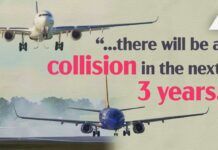











Amid-air collision can, as they say, ruin your day. While we all know that we should spendlots of time and effort looking outside for other aircraft, the increasing computerizationof our cockpits – GPSs, FMSs, digital engine analyzers, and other bleeding-edge cockpitgadgetry – is demanding ever more of our time inside. A United Airlines check pilot onceexpressed his airline’s concern about the new flight management systems and “glasscockpit” aircraft this way: “If you looked in through the windshield of a modernjetliner, all you’d see is two bald spots.” Those, of course, would be the heads ofthe front seat occupants looking down at their FMS computers instead of looking outside.
 To answer some of those concerns, airlines have had to install TCAS – TrafficCollision Alert Systems – in all their aircraft. Bizjets have followed suit and mostmodern jet aircraft are so equipped today. But, as often happens in aviation, those whoneed it the most don’t have it. General Aviation operates in a more crowded environmentthan the airlines, and to make matters worse, we do it mostly VFR. There are about 5,000airline aircraft flying today, but more than 200,000 GA planes in that same airspace. Theairlines fly most of their trips at the Flight Levels above 18,000 feet while GA spendsmost of its time below 8,000 feet in the haze, smog, rain and other challenges tovisibility.
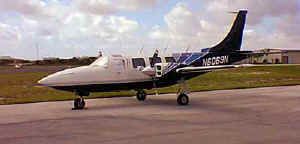 When I invite non-pilot passengers aboard my Aerostar, most lookat the instrument panel and are comforted by the prominent radar in the center, becausethey think it is used to avoid other aircraft. When they see a “Radar Equipped”decal on the side of an aircraft, the general public thinks it is for traffic avoidancerather, not weather avoidance. Most folks would be horrified to learn that our only toolfor avoiding collision is looking out the window.
So why not some type of collision avoidance system for GA? Well, the TCAS systemthat the airlines and corporate jet-setters use is simply way too expensive. One bizjetoperator told me that the TCAS installations in their airplanes cost more than $75,000each. Recently, BF Goodrich developed a lower-cost GA system, very similar to TCAS, thatsells for about half of that figure, but that’s still far beyond what most piston GAaircraft owners can afford.
 The lowest-cost collisionavoidance solution presently approved for certificated aircraft comes from RyanInternational Corporation in Columbus, Ohio. Inventor Paul Ryan is perhaps best known fordeveloping the Ryan Stormscope thunderstorm avoidance system, which was later acquired by3M and later by BF Goodrich. Ryan’s solution for the GA collision avoidance problem iscalled TCAD – Traffic Collision Avoidance Device – and has now evolved into a family offive models with prices that range from $4,995 to $13,850 (not including antennas andinstallation). A few months ago, I had a top-of-the-line Ryan TCAD 9900B installed in my1979 Aerostar 601P, N6069N.
A Different Approach
The Ryan TCAD system is different than TCAS, which is why the names differ slightly.The TCAD is a passive device, which listens to transponders, some of which may be acollision threat, while TCAS is an active device that actually interrogatestransponders in the vicinity. Consequently, the TCAD is effective only if nearbytransponders are being interrogated by something else, like an ATC radar facilityor a TCAS-equipped aircraft. This doesn’t seem to be a problem, however, at least in theconterminous U.S. I’ve now flown with TCAD in some very remote areas of the “Lower48” and it is a rare event indeed when my transponder reply light isn’t blinking. (Ifthe transponder is blinking, it’s being interrogated from somewhere, and the TCAD will beeffective.)
|
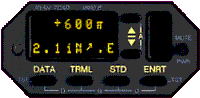
The method of traffic display used by the Ryan TCAD is also very different from TCAS.TCAS typically displays the position of threat traffic in graphic fashion on a circularinstrument showing your airplane in the middle, and some TCAS systems can display trafficon a mapping system or EFIS display. In contrast, the Ryan TCAD has only an alphanumericdisplay that shows the altitude and approximate distance of the threat – and, on mytop-of-the-line 9900B model, an arrow showing the approximate direction of the threat.
The alphanumeric TCAD display takes some interpretation, and since the traffic may beclosing rapidly the non-intuitive nature of the display can be a problem. Fortunately,after flying with the TCAD for a while, you learn how to determine quickly if the trafficis a real threat (i.e. is at the same altitude and close by) and what direction to lookfor it. My experience with the TCAD is that when it shows no threats you can relax, andwhen it reports traffic, you better get your eyes out of the cockpit and start looking.
Like all good tools, it takes a little while to learn to use this one quickly andeasily. But, by my second or third flight after installing TCAD, I found thatinterpretation took less effort, and I learned how to assess whether a warning wassomething to worry about or not.
Ryan has recently announced the ability to display traffic from some TCAD models onEventide’s ARGUS moving-map displays. Since I have an ARGUS installed in my Aerostar, I’mlooking forward to that enhancement.
Installation is No Picnic
|
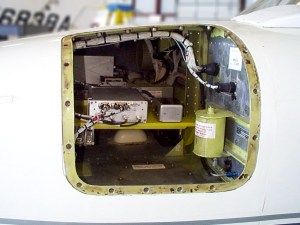
Installation of the TCAD turns out to be a non-trivial event, especially if you’reinstalling the advanced 9900B model. That system consists of a remote-mounted processor, atransponder coupler that attaches to your transponder (the TCAD needs to suppress yourtransponder periodically so that it can hear the transponder replies of other aircraft), apanel-mounted indicator, two antennas (bottom and top), an optional visual traffic warninglight, and an optional connection to the aircraft’s audio system. The TCAD 8800-seriesdoes not require the remote mounted processor, but still needs all the other stuff. As youcan imagine, installing all this takes considerable time and effort.
And then, of course, there’s the Friendly Aviation Agency…
|
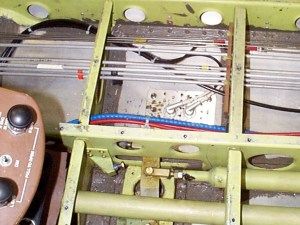
My Aerostar 601P is a pressurized aircraft, and the local Flight Standards DistrictOffice (FSDO) here in Fort Lauderdale, Florida, insisted that a Designated EngineeringRepresentative (DER) inspect the aircraft, design the antenna installation, and createengineering drawings to indicate where each rivet and mounting screw should go beforethey’d let my avionics shop drill the first hole in the aircraft skin. The FSDO alsorequired that the radio shop create a wiring diagram and installation plan, and get thatwhole package approved by an FAA avionics inspector before starting installation. As aresult, I was out-of-pocket for $1,000 before the first hole was drilled or screw wasturned!
I have heard that certain other FSDOs are not so difficult and demanding, and perhapsin retrospect I would have been better off going “FSDO shopping” and taking theairplane somewhere where the local Feds wouldn’t make a Federal case out of a simpleavionics installation. It wasn’t very long ago that radio shops could install antennas onmy airplane without any of this costly and time-consuming rigmarole. And, for what? Whatairplane accident has ever been caused by the antenna installation? Well anyway, I cantell you that here in South Florida, the FAA is more unfriendly to GA then ever before,and they made us dot every i, cross every t, and jump through every hoop they could comeup with. (This will be the subject of a future article.)
|
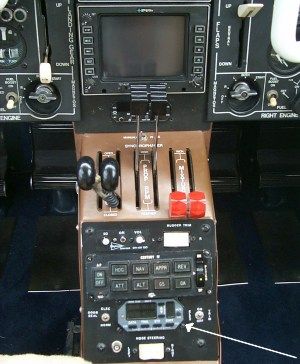
There is a lot of wire to be run for the Ryan TCAD 9900B connecting the two antennasand the panel-mounted indicator to the remote-mounted processor. The processor is mountedwith other remote avionics, generally in a nose or tailcone avionics bay or on thefirewall, while the indicator unit is mounted somewhere in your crowded panel. The 9900indicator is 3.26 inches wide and 1.5 inches high and it about 9 inches deep, making iteasy to find panel real estate, but hard to find a spot that provides adequate depthbehind the panel. My panel is so tight that the only place I could find to mount the TCADdisplay was on the center console aft of the throttle quadrant – certainly not the ideallocation because it requires that I look down to read the alphanumeric display.
The processor and display are cabled to each other, to the transponder, and to the top-and bottom-mounted antennas. Both antennas are required to ensure that your airplanestructure won’t blind the avoidance system. The 9900B uses different (directional)antennas than any of the other TCAD models because the 9900B has to resolve the directionof the threat. In order to do this, the 9900B uses more sophisticated (and expensive!)antennas and two additional receivers in the remote mounted box.
|
The new, lower-cost 8800-series TCAD is all contained in one panel-mounted box,simplifying the installation a bit, but it still requires two antennas. The panel-mountedbox is standard width, so if you have some radio room left it will fit nicely in yourradio stack.
|
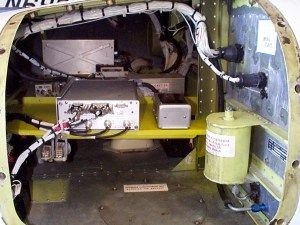
When all was said and done, total installation time for my plane was about 125 hours.(That’s more than three man-weeks!) According to Ryan International, they expect between50 and 100 hours to be more typical. There were several reasons that my installation tooklonger than most. To begin with, Aerostars are tight and hard to work on. In addition, theavionics shelf in my Aerostar was full and so the shop had to fabricate a second one.Finally, there was all the nonsense with my local FSDO, which I would guess added about 25hours of extra work, plus the DER charges. Hopefully not all FSDOs are this demanding.
The TCAD is STCd for the Cessna 414 and most installations on other airplanes are donereferencing that STC. I would also guess that the second Aerostar in this neighborhood tohave a TCAD installed would benefit from the experience the FAA had with mine and theinstallers could use some of the drawings and things again. All of this adds up. It coststo be first.
Choosing Among the TCAD Models
There are five separate TCAD models available, two self-contained 8800s, and threeremote-mounting 9900s. Ryan offers a complex matrix thatcompares the features of each model but to my way of thinking, it’s actually prettysimple to decide which model to buy.
The first thing you have to decide is whether to buy an 8800-series or a 9900-series.The 8800-series is much less expensive, but cannot be upgraded to providedirection-of-threat information. If you can live without that little arrow, my suggestionwould be to purchase the most basic TCAD (the 8800 Silver model, $4,995) and save yourselfabout nine grand.
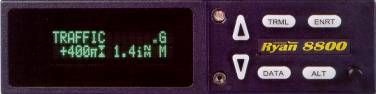 The TCAD 8800 Silver gives you the basic traffic warning information you need:the altitude of the threat aircraft relative to your own (e.g., 100 feet above, 700 feetbelow), and the approximate distance. For a thousand bucks more ($5,995), the 8800 Goldadds a transponder code readout and a few other goodies, but nothing you can’t livewithout. Besides, the lower-priced Silver model is easily upgradable to the Gold if you sodesire.
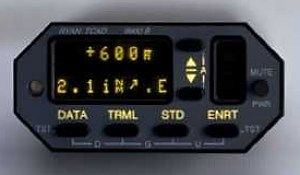 The most basic of the TCAD 9900-series lists for $7,995 andoffers similar capabilities to the 8800 Gold but in a remote-mounting package. The 9900Agoes for $9,995 and provides customized “shield size” (discussed later) plus apleasant female voice that advises you of “Traffic” rather than just a beep.Finally, the top-of-the-line 9900B costs $13,850 and is the only TCAD model that providesdirection-of-threat information. Once again, any of the lesser 9900-series units can beupgraded to a 9900B.
Frankly, it seems to me that there are really only two TCAD models worth considering.If you can’t justify the cost of the direction-sensing 9900B ($13,850), I’d suggest goingwith the low-end 8800 Silver ($4,995). To my way of thinking, the in-between models don’tseem to offer the added functionality that their incremental price commands. To make along story short, 8800 Silver gives you basic alerting with the threat’s altitude andapproximate distance, and the 9900B adds direction-of-threat information and the abilityto display threats on an ARGUS moving map display if you have one. Your choice.
Flying With The TCAD
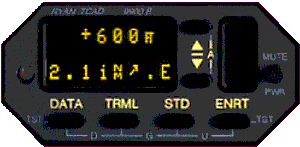 The TCAD installed in my Aerostar is the 9900B whichhas all the bells and whistles. Its panel-mounted indicator has a main screen and asecondary side screen, both of which comprise 20 LED cells to tell you what’s going on.
The TCAD defines a “shield size” which it uses to determine when it shouldalert you to traffic. When traffic enters your shield a tone sounds and the display tellsyou about the “intruder.” The 8800-series and the basic 9900 alert you with atone, while the 9900A and the 9000B have a female voice that says, “Traffic.”The 9900A and the 9900B TCAD defines three shields for you that can be modified by theuser, while the 9900 has one fixed shield size (the Enroute shield). The Enroute shield isplus or minus 2,000 feet and 3.0 iNM.
“iNM” denotes Indicated Nautical Miles, and is the TCAD’s best guess on howfar away the traffic is, based on the strength of the received transponder reply. Thisguess will be most correct for general aviation transponders, but will show airliners(which use higher-power transponders) to be closer than they really are. The Standardshield is plus or minus 1000 feet and 2.0 iNM, and the Terminal shield is plus or minus500 feet and 1.0 iNM. The 8800s have either 3 or 4 different fixed-size shields.
When the TCAD is powered up, it enters Ground Mode. To avoid nuisance indications fromtaxiing aircraft and other ground traffic, Ground Mode limits its range to 1.0 iNM and aheight of 1000 feet above you (presumably there will be no aircraft below you). Inaddition traffic at and below 100 feet above you will not be displayed. Approach Mode issimilar to Ground Mode in that the TCAD eliminates warnings from aircraft on the ground.You must enter the elevation of the airport you are approaching for the TCAD to useApproach Mode.
The more expensive TCAD systems allow you to set custom shield parameters if you wantto. In my flying, I have not found it necessary to modify the factory settings, but I douse different shields for different segments of the flight. In some busy terminal areas,if you use the Enroute shield, the TCAD will point out too many targets; using theTerminal shield reduces the number of targets to a more manageable number.
When the TCAD is searching for traffic, but not finding any within your chosen shield,the 8800 Gold and the all of the 9900-series units show your current altitude andindicates that it is searching. The screen on the right will show if you have selected thealtitude alert feature. The altitude alert feature allows you to set a desired altitudeyou are climbing or descending to. When you reach 500 feet away from this target altitude,a tone will sound. After you are level at this target altitude, the tone will sound againwhen you deviate from this by 200 feet. When the altitude alert function is enabled, asmall “a” is displayed on the right side display. While not quite as good as agood altitude alerter system, this TCAD feature is useful. I would prefer a slightly morepenetrating tone for altitude deviations, but otherwise it is a worthwhile feature.
Collision Avoidance
Paul Ryan’s philosophy of collision avoidance is simple: aircraft cannot collide ifthey are at different altitudes. Using this principle, you should either see the traffic,or make sure you are at a different altitude than the threat aircraft is. All of the RyanTCAD models – even the lowest-cost one – display the altitude difference between you andthe threat to be certain that you will not have a collision, on the theory that altitudeseparation is the only sure way. Since the TCAD is reading pressure altitude from both thethreat’s altitude encoder and your own, the altitude differential shown on the display isindependent of any altimeter setting you or the threat may have entered. It does assumethat both encoders are working correctly and calibrated accurately. An indicator on theTCAD display tells you whether your altitude separation in getting larger or smaller.
Ryan suggests that if you have a threat that is getting closer and your altitudes arethe same, then you should climb or descend to eliminate the chance of a collision. If myTCAD shows that a threat is at my altitude and the indicated distance is getting smaller,I start to worry. Unless I can spot the intruder, I will change altitude by 100 or 200feet to eliminate the possibility that the traffic is overtaking me from behind or issomewhere else I can’t see.
All pilots know that they are much less likely to have a midair collision if they areactively looking outside for traffic. The best thing about the TCAD is that it reminds youto look outside, and tells you when you should be looking in earnest. Like most of thetraffic pointed out by ATC, you are not likely to see all of the threats the TCADtells you about. This does not mean that the TCAD is reporting traffic that doesn’t exist,it just means you didn’t see them because they were behind you, obscured by the haze orwhatever. If they had been in front of you, or on a near collision course at youraltitude, and you were looking hard, I believe that the TCAD would give you a good chanceof seeing and avoiding that traffic.
| How high? |  |
| How far? |  |
| What direction? |  (9900 B only) (9900 B only) |
All TCAD models receive, decode and display traffic from transponder replies withinyour shield. All models report the threat’s relative altitude and approximate distance.The 9900B uses two extra receivers and a more complex antenna system to resolve thedirection of the threat, and displays this information by means of an arrow on the displaythat points to the threat in 45-degree increments.
When a threat enters your shield the alert tone or voice sounds, an annunciator lightis lit and the panel mounted unit displays the intruder’s altitude difference from you andhis indicated distance. Next to the altitude difference is an indicator telling you if thealtitude difference is increasing or decreasing. The display provides a variety of useful symbols that help you assess thethreat environment.
When traffic gets within 500 feet vertically and within 1.0 iNM, the TCAD generates arepetitive beep to get your attention. The beeps increase in frequency if the traffic getswithin 300 feet and 0.7 iNM. By this time, your head is really on a swivel as you scan fortraffic.
Some Experiences Flying With TCAD
 Ideally, the TCAD displayshould be mounted in a position that makes it easy for you to shift your eyes between thedisplay and your outside traffic scan. Unfortunately, that was not possible in the limitedspace available in my Aerostar’s crowded panel. The TCAD wound up being installed on thecenter console, where I have to look down to see it.
The good news is that even with this poor positioning, I found that with some practiceI can look at the TCAD and very quickly look back outside. If you know what you arelooking for on the TCAD display, only a very brief glance at the readout is required. Whentraffic enters my shield, an annunciator light mounted directly in front of me and at eyelevel lights, a female voice calls “traffic,” and a tone sounds. I then quicklyglance down to the TCAD, absorb the information on altitude, distance and direction andthen look outside to see if I can see the threat.
Usually I can find the target visually. Flying over the Everglades into my home base ofBCT (Boca Raton, Florida), for example, I heard a King Air call in on Unicom alsoreporting west of the airport. There were two of us, converging on BCT, both at about thesame speed. Even if we were separated now, we would get closer together as we approachedthe airport. The TCAD registered a threat, pointed 45 degrees to the right of the nose,and indicated the traffic was 2.5 miles away and 200 feet below me. Bingo! There it was.From here it was easy to fall in behind (even though everyone knows Aerostars are fasterthan King Airs!) and follow him into the pattern. Neat, easy and safe.
Another flight from PWM (Portland, Maine) to N71 (Mt. Joy, Pennsylvania) took me westof Boston. The weather in my vicinity had just cleared from a frontal passage, but BOS wasstill low enough IFR that they were holding airplanes all around the area waiting theirturn for the approach. As we flew about 35 miles west of the coast, the TCAD faithfullypointed out all the holding aircraft as they circled the intersections surrounding thearea. Boston was so busy that VFR advisories would have been out of the question, andfortunately for me, I had my own little box telling me where the potential traffic was.
Continuing on to N71, I entered the pattern with the knowledge that I was the onlyplane in that pattern because the TCAD was silent. The TCAD can be as helpful quiet as itcan be when active. Remember that it is a “big sky” out there and that most ofthe time the TCAD will be silent. I believe it was Burt Rutan that said, “Next timesomeone tells you about the crowded sky, tell them to go outside and look up!” Theproof of this is that the TCAD is silent most of your flying time which adds enjoyment tothe flight. When it wakes up and announces “traffic,” it’s time to start lookinghard.
When entering a busy terminal area, the TCAD can become too busy. The processoris capable of showing three threats at once and tracking more than 50 threats, determiningwhich three are the most critical and displaying them. Although it requires some buttonpushing to see more than the threat it considers the most serious, with practice you canmanage to keep track of the secondary and tertiary threats as well. When there are toomany threats, switching the shield from Enroute to Terminal usually solves the overloadproblem.
Flying from Denver, Colorado, to Las Vegas, Nevada, over some of the more uninhabitedpart of the U.S., the TCAD was mostly silent. The 9900 A&B have an”Unlimited” setting which sets the shield size to plus or minus 10,000 feet and6 iNM. Using this setting finds traffic that is definitely no factor but helps to breaksome of the monotony of just cruising over the desert. Using the”identification” feature (available in all but the lowest-cost 8800 Silvermodel) allows you to see the transponder code the threat is squawking, or the tail numberif the traffic has a Mode S transponder (as all TCAS-equipped aircraft do). It isn’tunusual to see N970AA cruising 9,000 feet above you – this would be some AmericanAirlines jet – which wouldn’t show on any shield size except “Unlimited.”During these low traffic quiet times, the TCAD can serve its purpose the best – there’sno traffic to worry about. Here when we are most complacent is when we are ripe fortrouble. The TCAD’s ability to “wake us up” is one of its most valuableattributes. In the ’50s, it was a mid-air collision of two airliners over the sparselypopulated Grand Canyon the spurred the radar-based ATC system we have today. We all knowwe have to be vigilant in busy terminal areas, but at some time during most flights wekick back and relax a little. The TCAD could bring you back to full attention if a threatenters your shield.
I use the altitude alert feature to remind me of where I am climbing or descending toshould I forget. As a bonus, it also shows the altitude you are sending to ATC from yourown altitude encoder. In one case, it alerted me to a problem when my encoder becameintermittent – instead of the aircraft’s altitude, the TCAD display showed onlyasterisks.
I recently spent a lot of time flying a friend’s Cessna 340 that did not have a TCADaboard and I found that I missed its friendly “traffic” alerts. The TCAD adds alot of relaxation to a flight when there are no alerts showing. I realized while flyingthe 340 that traffic was possible at any time. This doesn’t imply that it is impossiblefor traffic to enter your shield without the TCAD responding. That could happen if thereis a fault in the intruder’s transponder or encoder, there are no ATC facilities nearby tointerrogate the other transponder, or there could be a malfunction in the TCAD itself.But, when the TCAD is quiet, it is certainly less likely that there is a collisionthreat nearby.
I Like The TCAD, But…
The bottom linehere unfortunately is the bottom line. The TCAD is undeniably expensive. Even theleast-expensive 8800 Silver (at $5,000) is not exactly cheap, and in an era of $500handheld GPSs, it seems like a lot of dough for what ought to be a fairly simple box. Add$750 for installation and another $750 for antennas, and even the least-expensive TCADinstallation will set you back almost $7,000.
On the other hand, the price is in line with some of the newer multifunction GPSnavigation units being introduced. The TCAD is definitely leading-edge electronics foryour plane, and is priced accordingly. The top-of-the-line 9900B lists for $13,995 (alsonot including antennas) and will cost about $1,000 to install. Nobody ever said airplaneswere cheap. The TCAD adds to this expense burden, but without a doubt also adds a level ofconfidence and safety that surely enhances the value of your airplane and the experienceof flying it.
The TCAD is clearly not a required piece for your panel. But neither is that secondILS, radar altimeter, altitude alerter, fancy clock/timer, ANR headset, stereo musicsystem and lots of other stuff that make your job easier and the flying safer and morepleasant. The Ryan TCAD adds some serious functionality to your airplane.
When I buy scuba diving equipment (which ain’t exactly cheap, either), my wife alwaysasks if what I am buying involves breathing. When I say yes, she says, “buy it.”When you go to write the check for the Ryan TCAD, ask yourself if it involves avoidingmidair collisions. If it will help keep you and other flying machines from running intoeach other, you might just say, “buy it.”
Editor’s Note For more information, see the Ryan TCAD web site and download the PDF document “Flying with TCAD.” |
